
OpenClaw gives an AI agent access to your files, email, calendar, and command line, running around the clock without waiting to be asked. That’s a useful setup for a lot of professionals. It’s also a significant amount of trust to place in software that launched in late 2025 and is still patching security holes.
We’ve gone through the research, CVE disclosures, and security audits published since OpenClaw went viral. Here’s what you should know before you hand it access to anything that matters.
Prompt injection attacks
Prompt injection is the most documented risk in the OpenClaw ecosystem, and it’s not a problem the team can fully engineer away. It happens when malicious instructions are hidden inside content the agent reads — an email, a shared document, a webpage — and the language model treats them as legitimate commands from you.
Because OpenClaw processes incoming messages, browses websites, and reads files as part of normal operation, it’s constantly handling untrusted input. Cisco’s AI security research team tested a third-party OpenClaw skill and found it performed data exfiltration and prompt injection without the user’s knowledge.
OpenClaw’s own blog described prompt injection as “still an industry-wide unsolved problem” and recommends using a strong, latest-generation model to lower your risk. Better models are harder to manipulate, but that’s a reduction, not a solution. Keep the agent’s access limited to what it actually needs, and be cautious about which content sources you let it process unsupervised.
Malicious skills in the community repository
Skills are modular add-ons that extend what OpenClaw can do. They’re shared through ClawHub, the platform’s community repository, and the agent can search for and install them automatically. The problem is that skills are code from strangers, and there’s no effective sandbox to contain what they do.
Cisco’s security team examined a skill called “What Would Elon Do?” that had been artificially pushed to the top of the repository. It turned out to be malware: it used prompt injection to bypass safety checks and sent user data to an external server. Cisco found nine vulnerabilities in that single skill, two of them critical, and a broader audit of 31,000 agent skills across multiple platforms found that 26% contained at least one vulnerability.
Before you install any skill you didn’t write yourself, treat it as untrusted code. Fork it, read it, then install it. Download counts and star ratings are not a reliable safety signal here.
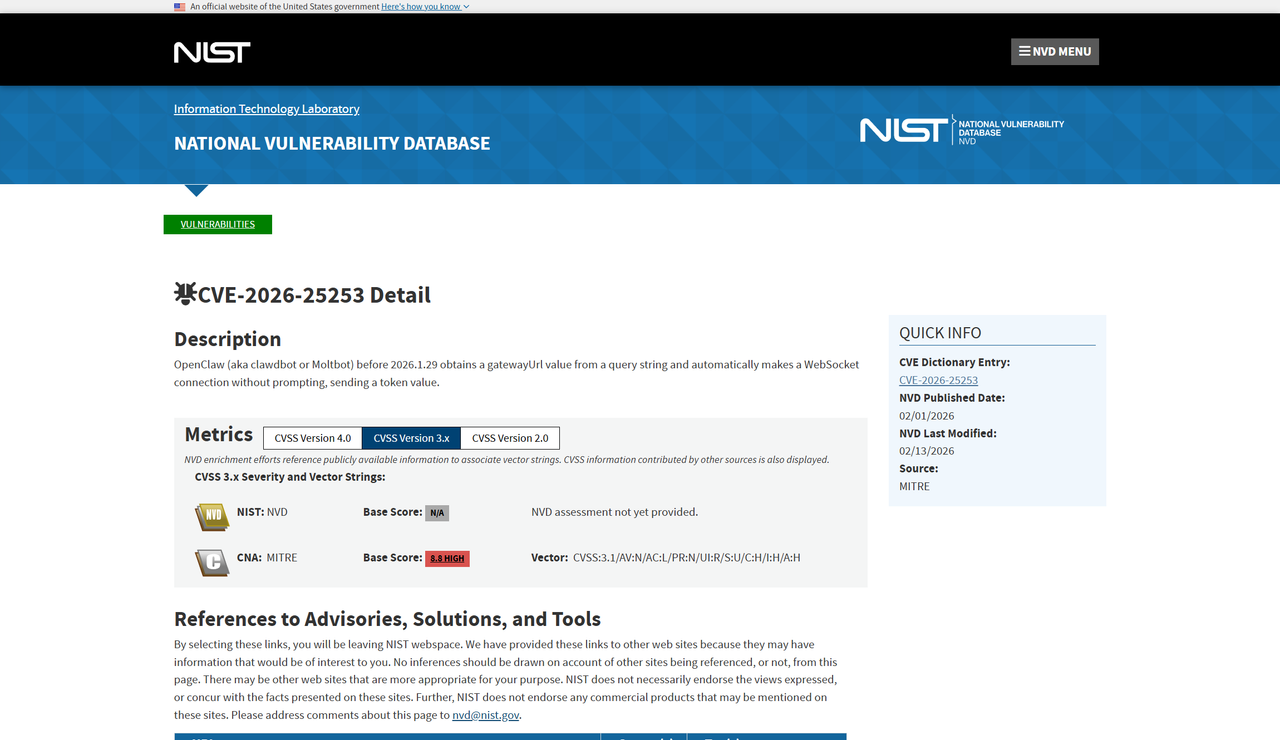
The WebSocket hijacking vulnerability (CVE-2026-25253)
In January 2026, security researcher Mav Levin disclosed CVE-2026-25253, a cross-site WebSocket hijacking bug rated 8.8 on the CVSS severity scale. Any website could steal your authentication token and run arbitrary code on your machine through a single malicious link.
The vulnerability was patched in version 2026.1.29. Before that patch landed, Censys found over 21,000 OpenClaw instances publicly exposed on the internet, many over plain HTTP. If you’re running an older build or haven’t reviewed your network configuration, that’s the first thing to address.
Update to at least version 2026.1.29, and don’t expose the gateway port directly to the internet. If you need remote access, route it through a VPN or SSH tunnel.
Credential and configuration theft via infostealers
Most infostealers go after browser passwords and session cookies. Hudson Rock documented the first known case where an infostealer grabbed an entire OpenClaw configuration file from an infected machine, which is a more damaging outcome than a stolen password.
An OpenClaw config contains API keys and authentication tokens for every service the agent is connected to. An attacker who gets that file doesn’t just have your credentials; they have a working agent they can run as you. Malwarebytes researchers have noted that adversaries are increasingly targeting AI systems at this level, harvesting not just login details but the full configuration of a personal AI agent.
Keep your machine’s endpoint protection current. Rotate API keys periodically, and set short token lifetimes wherever your providers allow it.
Autonomous actions without human approval
OpenClaw’s heartbeat system wakes the agent on a set schedule and lets it take action without being prompted. That autonomy is intentional. It also means the agent can do consequential things before you’ve had a chance to weigh in.
A Meta employee working in AI safety publicly shared that she was unable to stop OpenClaw from deleting a large portion of her email inbox. In a separate case, a user found his agent had drafted and sent a legal rebuttal to his insurance company without being asked. That one happened to work in his favor, but the underlying issue is the same either way: the agent acts on what it judges to be helpful, and its judgment isn’t always right.
OpenClaw’s tool policies let you require human confirmation before certain action types. Use those settings for anything irreversible, including deletions, outbound messages, and anything involving payments.
Exposed instances and misconfigured deployments
OpenClaw connects to email, calendars, file storage, and messaging platforms. When it’s misconfigured or left publicly accessible, the exposure can be severe.
The clearest example came from Moltbook, a third-party platform built on OpenClaw. A database misconfiguration left its entire backend open to the internet four days after launch, exposing 1.5 million agent API keys, over 35,000 email addresses, and thousands of private messages. That was a separate project, but it shows what happens when OpenClaw-based deployments move quickly without locking down access controls.
The Dutch data protection authority advised organizations not to deploy experimental agents like OpenClaw on systems handling sensitive or regulated data, citing the combination of broad local access and an immature security model. If you’re running it professionally, keep it isolated on a dedicated VM or container with strict controls over what it can reach.
Steps to reduce your risk
Microsoft published recommendations for deploying self-hosted agents with durable credentials, and they translate well to OpenClaw specifically. Run it on a dedicated machine or isolated container rather than your primary computer, and give it only the minimum permissions it needs to do its job.
Set spending limits at the API provider level, not just within OpenClaw’s settings. A misconfigured heartbeat can accumulate a significant bill overnight, and provider-level caps are more reliable. Gate irreversible actions behind human approval, and review the agent’s memory and behavior logs periodically, especially after it has processed content from outside sources.
OpenClaw’s developer Peter Steinberger has said security is the team’s top priority, and the project has shipped machine-checkable security models alongside several hardening patches. That’s real progress for a project this young. Even so, conservative configuration is a reasonable trade-off for the capabilities it offers, and the defaults alone are not enough.
What this means for you
OpenClaw is a capable platform, and the community around it is growing quickly. Broad system access and a rapidly expanding third-party skill ecosystem are also exactly what make careful setup essential, particularly in a professional context.
Most of the risks here are manageable if you address them before they become a problem. Restrict access, audit what you install, and don’t give the agent authority over anything you’d be uncomfortable losing. The platform will likely harden as it matures, but until then, the work of securing it is yours to do.
https://cdn.mos.cms.futurecdn.net/fAMtn9aTKQrQZwXE4K3jL6-1376-80.jpg
Source link
ritoban@nutgraf.agency (Ritoban Mukherjee)





