
QuickBooks Workforce has grown beyond its payroll roots, adding recruiting, onboarding, time tracking, and performance management to its employee payment tools. For small businesses handling HR tasks across spreadsheets and separate applications, the expanded platform offers a way to bring more of that work together.
But having several HR functions under one subscription doesn’t automatically make it the right choice. Many of QuickBooks Workforce’s newer tools require a higher-priced plan, and businesses with more specialized HR requirements may still need additional software.
This QuickBooks Workforce review examines its pricing, HR capabilities, administrative controls, and overall usability to help employers decide whether it can support their current needs and future growth.
What is QuickBooks Workforce
QuickBooks Workforce is Intuit’s cloud-based HR, payroll, and workforce management platform for U.S. businesses. Previously known as QuickBooks Payroll, it expanded in 2026 to support more employee management responsibilities, including hiring, HR workflows, and performance reviews.
The platform is designed for small and growing businesses that want to handle routine HR administration alongside payroll. It also connects directly with QuickBooks Online accounting, allowing employers to maintain payroll expenses alongside other financial records.
 |
|
|---|---|
| Best for | Small and growing businesses seeking connected HR and payroll tools |
| Free plan | None |
| Starting monthly price | $50 base fee plus $7 per employee |
| Core features | Payroll, employee records, recruiting, onboarding, time tracking, HR workflows, and performance reviews |
| Employee self-service | Web portal and mobile app |
| Payroll tax filing | Federal and state taxes; automated local tax filing in higher tiers |
| Accounting integration | Native QuickBooks Online integration |
| Customer support | Phone, chat, online resources, and expert services |
QuickBooks Workforce’s appeal is its ability to support several HR functions within one platform, particularly for employers that don’t have large HR teams. However, the entry-level subscription remains primarily focused on payroll, so businesses looking for a more comprehensive HR system will need to consider the higher tiers.
Employers with more specialized requirements should also compare other HR software solutions to determine whether Workforce offers enough functionality for their needs.
QuickBooks Workforce is a good fit for
- Small businesses consolidating HR and payroll: QuickBooks Workforce combines employee records, hiring, onboarding, time tracking, and payroll, making it suitable for employers looking to replace several separate applications.
- Companies with hourly or shift-based employees: Premium and Elite plans connect scheduling, time tracking, leave management, and payroll, reducing the need to transfer employee hours between systems.
- Businesses already using QuickBooks Online: The native accounting integration keeps payroll expenses connected with financial records, making it easier to manage labor costs and bookkeeping.
QuickBooks Workforce is less suited for
- Businesses seeking an inexpensive standalone HR system: The entry-level subscription focuses on payroll, while recruiting, onboarding, and other HR functions require more expensive plans.
- Organizations with advanced talent management needs: Companies requiring succession planning, comprehensive learning management, or extensive workforce analytics may find the platform’s capabilities too limited.
- Employers requiring extensive customization or global HR support: Workforce primarily serves U.S. businesses and may not accommodate complicated international operations.
QuickBooks Workforce pros and cons
|
|
QuickBooks Workforce pricing
QuickBooks Workforce has three tiers, each with a monthly base fee and a charge for every employee. All include full-service payroll, basic employee records, and employee self-service, but businesses need the higher tiers to access most HR management features.
- Workforce Payroll: $50 per month plus $7 per employee monthly. Includes unlimited payroll runs, federal and state payroll tax filing, direct deposit, and basic employee records. It suits employers that need payroll but already have other HR tools.
- Workforce Premium: $88 per month plus $13 per employee monthly. Adds recruiting, onboarding, scheduling, time tracking, leave management, and five custom HR workflows. It also includes automated local tax filings where supported and an expert payroll setup review.
- Workforce Elite: $134 per month plus $17 per employee monthly. Includes performance management, advanced time tracking, unlimited HR workflows, and a personal HR advisor. Expert payroll setup and eligible tax penalty protection are also included.
For a business with 10 employees, Workforce Payroll costs $120 monthly, compared with $218 for Premium and $304 for Elite. Premium provides a wider range of everyday HR functions, while Elite is easier to justify when employers need formal performance reviews or more extensive workflow automation.
Additional fees and expenses
Employers may also encounter the following charges:
- Additional state tax filings: Workforce Payroll and Premium charge $12 monthly for each additional state filing. Elite doesn’t charge this particular fee.
- Background checks: Integrated Checkr screenings start at $29.99 per report.
- Employee benefits: Health insurance, retirement plans, workers’ compensation, and certain benefits administration services may involve separate provider fees, coverage costs, or additional charges.
QuickBooks Workforce HR capabilities
QuickBooks Workforce combines payroll with tools for hiring, managing employee records, tracking work hours, and conducting performance reviews. Here are some of its key features.
Hiring, onboarding, and employee records
Workforce Premium and Elite include applicant tracking, job postings, offer letters, and digital onboarding. Once a candidate accepts an offer, HR can use their information to begin collecting employment documents, including tax forms and Form I-9. Administrators can monitor incomplete paperwork and arrange background checks through Checkr for an additional fee.
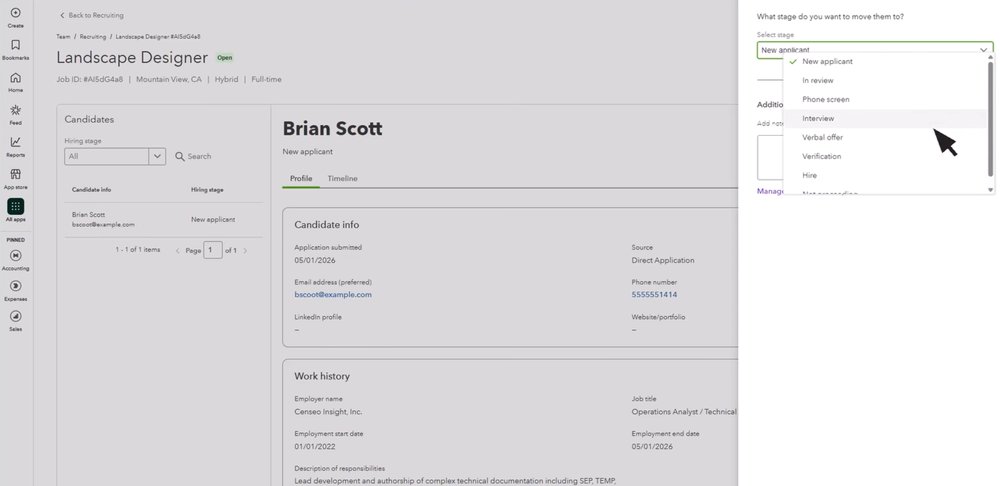
These tools cover routine hiring needs. Businesses that handle complex interview stages, extensive candidate assessments, or high-volume hiring may find dedicated applicant tracking system or onboarding software more suitable.
QuickBooks Workforce also maintains employee profiles, employment history, and HR documents. Templates and electronic signatures support agreements and policy acknowledgments, while effective dating lets administrators schedule changes in advance. For example, HR can enter a promotion or pay adjustment before its effective date instead of updating the record later.
Time, attendance, and payroll
Time tracking is included in Workforce Premium and Elite, connecting employee schedules, attendance, and timesheet approvals with payroll. Employees can clock in using mobile devices or workplace kiosks, while managers review and approve their hours. Approved entries then flow into payroll without requiring separate data entry.
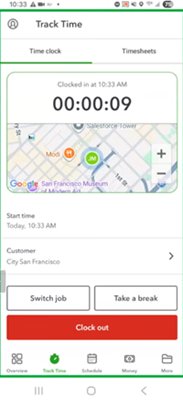
Leave management supports time-off requests, accruals, and carryover rules, although employers can create only five custom paid or unpaid time-off policy types. Getting an Elite plan adds geofencing, mileage tracking, and project time reporting for businesses with field employees.
Meanwhile, its payroll module covers hourly and salaried workers, including overtime, bonuses, commissions, deductions, and off-cycle payments. Auto Payroll handles recurring payments for eligible employees with predictable wages. Payroll AI, available to eligible Premium and Elite customers, instead collects hours, identifies missing information, and prepares payroll drafts. The two automation options cannot be used together, and administrators must still review payments before submission.
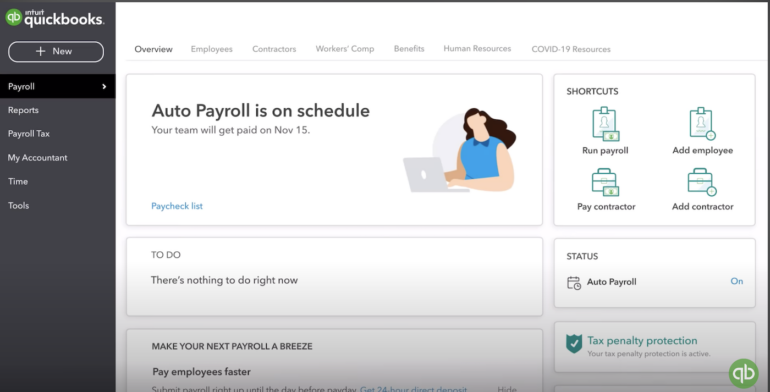
Federal and state payroll tax payments and filings are automated across all plans after the required setup. Local tax administration differs:
| Federal tax payments and filings | ||
| State tax payments and filings | ||
| Local tax calculations | ||
| Local tax payments and filings |
Employers using the entry-level plan must handle local tax payments and filings themselves. Premium and Elite automate supported local filings after the required setup and tax agency enrollment.
Also see: If pay processing tools are more important to your business, read our guide to the best payroll software and services.
Benefits and employee self-service
Employees can access pay stubs, download W-2 forms, and update certain personal information through the Workforce portal and mobile app. Higher subscriptions also support time entries, leave requests, and assigned HR tasks. Managers can handle selected requests for direct reports without receiving full administrative access.
Benefits are available through third-party partners, including Allstate for health insurance, Vestwell for retirement plans, and NEXT for workers’ compensation. Supported contributions can be included in payroll deductions, but enrollment and ongoing administration may still involve the benefits provider’s tools, although eligible businesses can purchase integrated benefits administration separately.
Performance management and development
Workforce Elite includes tools for running employee reviews and monitoring evaluation progress. HR can create templates, assign participants, and organize review cycles, while an Activity dashboard identifies incomplete assessments. Employees can also establish goals, track milestones, and receive manager feedback.
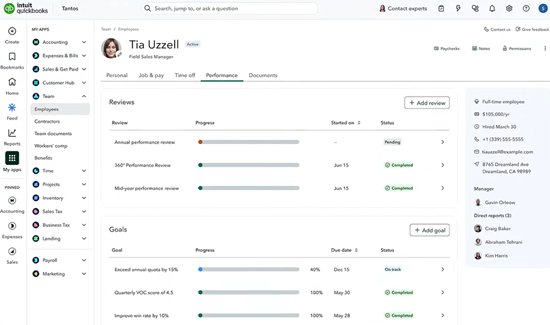
For small businesses introducing formal quarterly or annual evaluations, these functions may replace separate review forms and tracking spreadsheets. However, QuickBooks Workforce focuses more on managing review cycles than broader talent development. Companies requiring succession planning, detailed competency assessments, or learning management may still need specialized HR software.
QuickBooks Workforce HR controls & reporting
QuickBooks Workforce includes tools for managing HR approvals, assigning user permissions, and reviewing workforce data. These settings allow employers to distribute responsibilities among managers without giving everyone access to sensitive employee records.
Workflow customization
Workforce’s HR workflows allow Premium and Elite subscribers to organize tasks involving multiple people or departments. Administrators can assign responsibilities, establish approval requirements, and determine whether tasks proceed sequentially or independently.
Common uses include:
- Offboarding: Coordinate final paperwork, manager responsibilities, and equipment returns.
- Employee changes: Route promotions or other employment updates through the appropriate approvals.
- Recurring activities: Schedule administrative tasks around specific dates, such as employee work anniversaries.
Premium supports five custom workflow configurations at a time, while Elite allows unlimited configurations. The lower limit may be sufficient for basic approvals, but HR teams automating several processes could reach it quickly.
Access permissions
Not every supervisor needs access to an employee’s complete personnel record. Workforce Premium and Elite let employers assign managers to direct reports and grant access to specific tasks and information, such as leave approvals and employee goals, without giving them full administrative privileges.
|
|
These restrictions are useful for HR teams delegating everyday responsibilities to department managers. Permissions still require careful setup, particularly when supervisors handle several functions. Giving managers the appropriate access helps keep approvals moving without exposing confidential employee information.
Reporting and integrations
Workforce reports cover payroll expenses, tax liabilities, employee compensation, time-off balances, and historical payments. Businesses using its time-tracking features can also examine labor hours across different jobs or projects. For instance, comparing estimated and actual hours can help identify jobs that require more staffing than originally planned. Reporting is less extensive for broader HR analysis, such as employee turnover trends, succession planning, or workforce forecasting.
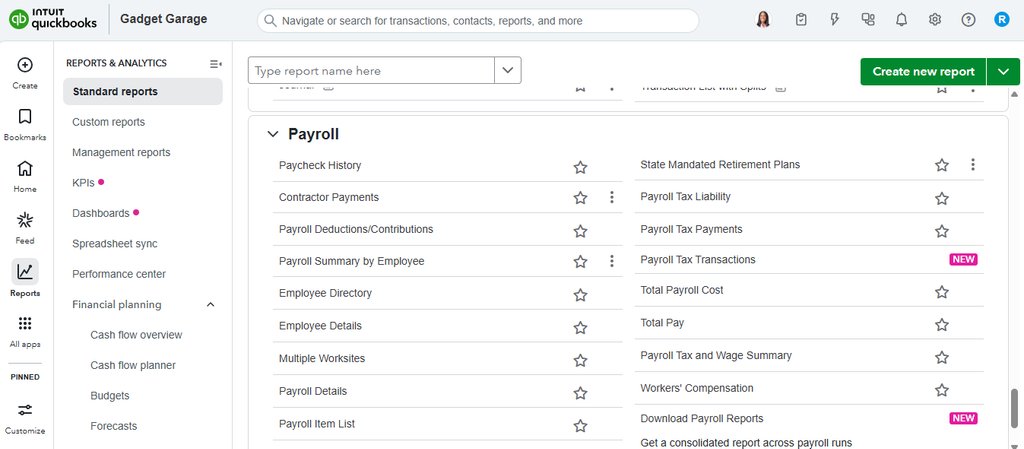
The connection with QuickBooks Online accounting allows payroll expenses and related transactions to flow into financial records. This keeps wage and payroll tax information alongside other operating costs, although employers using a different accounting platform should verify their available integration options and data-transfer requirements.
To learn more about its accounting functionalities, read our QuickBooks Online review.
QuickBooks Workforce implementation & support
Moving to QuickBooks Workforce involves transferring employee and payroll information, setting up company policies, and preparing staff to use the software. The amount of work depends on whether a business is switching payroll providers or also replacing its existing HR applications.
Setup and data migration
QuickBooks Workforce has an online wizard that guides new clients through the setup process. If switching from ADP or Gusto, it offers assisted payroll migration for eligible businesses. Employers can also upload reports from their previous provider, and Intuit Intelligence extracts employee information, earnings, deductions, and payroll history for an expert to review before importing.
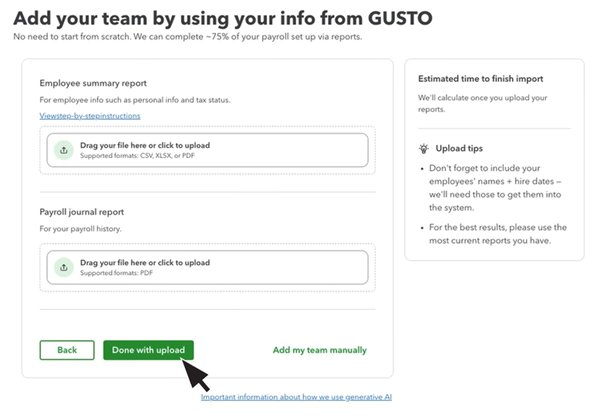
This can make changing providers less labor-intensive, but employers still need to check the transferred records for accuracy. Incorrect year-to-date wages, tax withholdings, or employee details can affect subsequent payroll runs and year-end reporting.
Setting up the broader HR features requires a little more planning. Before introducing QuickBooks Workforce to employees, businesses should:
- Review existing records: Identify the employment documents and historical information that need to be retained.
- Prepare HR policies: Confirm leave rules, approval requirements, and other company procedures before configuring them.
- Plan the rollout: Decide which functions to introduce first and provide employees and managers with instructions for using the portal.
Customer support and HR guidance
QuickBooks provides phone and chat support, online resources, and payroll setup assistance. Premium includes an expert review of payroll setup, while Elite offers a more hands-on service.
| Workforce Payroll | Monday to Friday, 6 a.m. to 6 p.m. Pacific Time (PT) |
| Workforce Premium and Elite | Monday to Friday, 5 a.m. to 7 p.m. PT Weekends, 6 a.m. to 3 p.m. PT |
Premium and Elite also include Mineral-powered HR resources, such as an employee handbook creator, compliance alerts, and employment guidance. Elite subscribers can contact a personal HR advisor for more specific questions.
For payroll tax notices involving payments and filings handled by Intuit, Workforce provides expert assistance with investigations and agency communications. Employers remain responsible for outstanding taxes and applicable compliance requirements.
QuickBooks Workforce alternatives
QuickBooks Workforce offers a wide selection of HR and payroll functions, but other platforms may provide a better match for certain requirements.
| Gusto | Small businesses prioritizing payroll and benefits | $49 base fee plus $6 per employee |
| BambooHR | HR teams focused on employee development | $10 per employee |
| Rippling | Businesses with complex HR and IT needs | Call for a quote |
Looking for something else? Check out our best QuickBooks Workforce alternatives guide to find other options.
Final verdict
QuickBooks Workforce is a good fit for small and growing U.S. businesses that want payroll and routine HR administration in one system. Premium offers the strongest balance of features for employers managing hiring, employee schedules, and everyday HR requests. Elite makes more sense for companies that need formal performance reviews, advanced time tracking, or extensive workflow automation.
I recommend Workforce to businesses consolidating core HR and payroll activities, particularly those already using QuickBooks Online. However, employers with complex talent management requirements or limited need for its higher-tier features should compare specialized HR software before committing.
Frequently asked questions about QuickBooks Workforce
Does QuickBooks Workforce support contractor payments?
QuickBooks Workforce supports contractor management and includes unlimited standard e-filing of eligible 1099-NEC and 1099-MISC forms. Employers can prepare and file these forms through QuickBooks, although certain automated 1099 services require a separate product or additional fees.
Does QuickBooks Workforce support multistate payroll?
Yes. Employers can process payroll for employees working in multiple US states and manage the associated tax requirements. Workforce Payroll and Premium charge an additional monthly fee for each additional state tax filing, while Elite doesn’t charge that particular fee.
Can employees access pay records after cancellation?
Yes. Employees can continue accessing their pay stubs and other available documents through QuickBooks Workforce for up to 12 months after an employer cancels the payroll subscription. Employers should advise staff to download any records they want to retain before that access expires.
https://assets.techrepublic.com/uploads/2022/11/tr-best-payroll-small-business.jpeg?f=jpeg
Source link
Robie-Ann Ferrer