
Oh, AI expansion, is there nothing you can’t ruin? It seems like there’s always some drama in the world of modern generative AI, whether it’s ChatGPT 5.2 ruining some functionality of previous versions, or Elon Musk’s Grok merrily producing explicit content, or Microsoft ruining Windows with Copilot, or Microsoft ruining Windows some more with Copilot, or Microsoft ruining Windows even more with Copilot, or… well, you get the idea (and yes, those are three separate stories).
The latest AI chicanery to grind my gears is, unsurprisingly, the RAM crisis. AI datacenters require a lot of hardware, and we’ve been seeing the impacts of this new industry’s growth for a while now, with GPU and SSD prices slowly creeping up, but the price of memory in particular has spiked aggressively since December, with 64GB of DDR5 RAM now costing more than a MacBook.

If you’re a seasoned PC-builder like me — or you’ve simply been considering some piecemeal upgrades to an aging desktop system — you’re probably in panic mode right now. The usual upgrade advice has been thrown out of the window; where once I would have consistently recommended more RAM or a bigger, newer SSD as small, simple upgrades to your PC, I now find myself admitting that buying a pre-built system might be a better idea.
Don’t lose hope, though. There are still options; not everything has been completely annihilated by the rising demand for AI hardware, at least not yet. So if you’re contemplating an upgrade to your desktop, this is my refresh advice, presented in descending order of priority. Let’s get started!
Get a better GPU
I can’t believe I’m saying this, but the way to get the most bang for your buck right now is probably by upgrading your graphics card. Yes, this still has potential to be a pricey upgrade, but it’s going to produce a much greater performance boost than swapping in some new memory or a fresh CPU.
Based on the video card section of the latest Steam Hardware Survey, a not-insignificant portion of y’all are still rocking older cards like the RTX 2060 and GTX 1650. Without wanting to sound like some sort of wealthy purist, if you’re still trying to play the latest games on a 20-series card or older, it’s probably time to get yourself one of the latest and best graphics cards.

You don’t need to shell out for an RTX 5090 to see a significant step up in gaming performance from your rig, though. Any RTX 4000- or 5000-series GPU from Nvidia will provide a good step up in performance from older budget GPUs, with the RTX 5060 Ti ideal for gaming at 1080p and 1440p.
Of course, the higher you go, the more of a boost you’ll see, but be wary of bottlenecks; leaping from a 2060 to a 5080 will almost certainly also require an upgrade to your CPU, PSU, and most likely your motherboard too.
If you’re on a tighter budget, Intel‘s offerings are surprisingly great nowadays. We scored the Intel Arc B5080 a rare five stars in our review, citing its incredible 1440p performance and competitive pricing, and also praised the Intel Arc B570 as a fantastically affordable 1080p gaming GPU.
Replace your monitor
Okay, this isn’t technically a direct improvement to your system (and I promise I won’t start calling a new keyboard a ‘PC upgrade’), but there’s no denying that a better monitor can significantly improve your gaming experience. And right now, upgrading your display can be surprisingly affordable.
The best monitor for your specific needs will vary, but if you shop the sales it’s a lot easier to snap up a cut-price display right now than some discount RAM. In terms of sheer cost-effectiveness, a new monitor is definitely an upgrade that PC-builders should consider — not least because it’s a very ‘future-proof’ upgrade.

Unlike the components inside your rig, your monitor is wholly independent and should never have issues with compatibility; even if your existing system isn’t pushing the limits of your display, it’ll still work great, and upgrading effectively eliminates future display bottlenecks caused when you do upgrade the rest of your setup.
In terms of what to actually get, a good rule of thumb is to bump things up by one standard resolution level. So if you’re currently using a 1080p monitor, look for a 1440p one; if you’re at 1440p, spring for 4K. It’s also worth keeping an eye on refresh rate (120Hz should be plenty for everyone except serious esports gamers) and, of course, size. Bigger is better, and getting a larger display can improve immersion (and productivity, if you use your PC for work) without requiring an actual performance increase. If you regularly do creative work like digital art or photo editing, it’s worth paying close attention to the color gamut and contrast ratio, too.
Upgrade your CPU (and perhaps more)
They’re a bit more expensive than they used to be, but desktop CPUs haven’t been as badly hit by the shifts in the PC hardware industry as most other components. You can still snap up a solid midrange chip for a good price; at the time of writing, Newegg has the AMD Ryzen 5 9600X for just $199.99, and you get a free AIO liquid cooler too.
With that in mind, the correct CPU upgrade for you won’t be as simple as picking one of the best processors. If you’re upgrading from an older CPU, it’ll likely also mean upgrading your motherboard because you’ll need a different chip socket. Thankfully, mobos also haven’t seen the same sharp price hikes, but there’s another problem: many newer motherboards require DDR5 memory (and the DDR4 DIMM socket is different, so there’s no backwards compatibility with older RAM), and we’re trying to avoid spending an arm and a leg on new RAM.
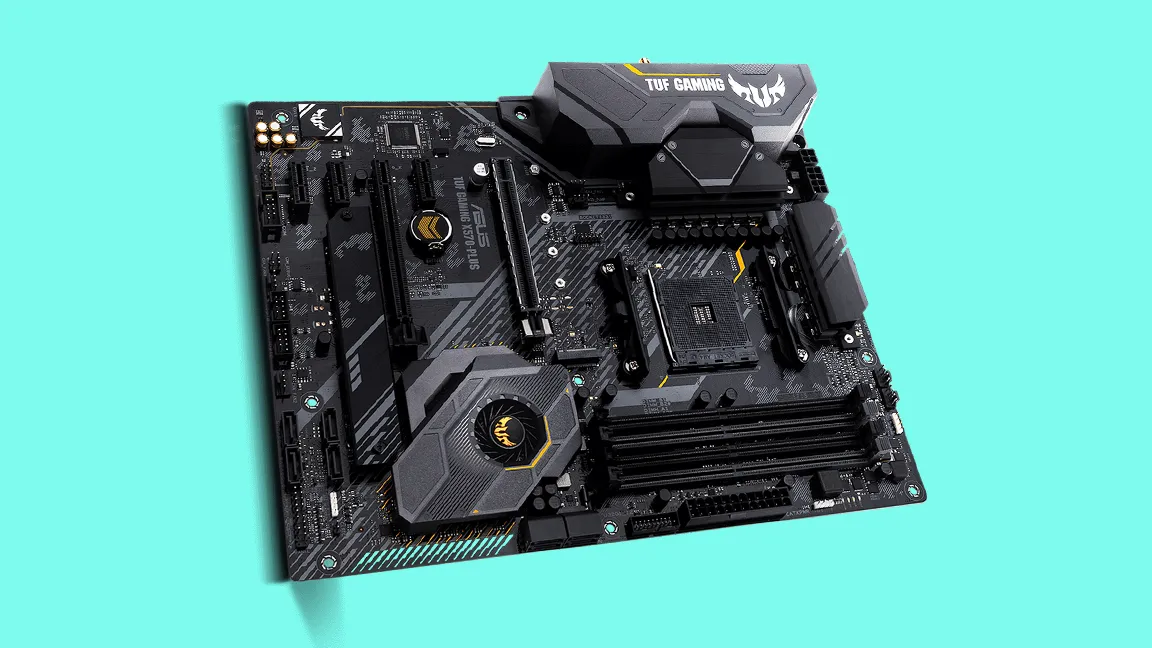
Thankfully, AMD hasn’t completely abandoned the AM4 chipset yet, so you can find motherboards that will accept AM4 chips and DDR4 memory. AM4 CPUs themselves ended with the Ryzen 5000 series, which is admittedly a few years old now, but they’re still very solid chips for gaming; you can pick up a 5800X or XT for only a couple hundred dollars or pounds right now, and that represents a very solid upgrade over any older AM4 Ryzen chip. Meanwhile, an AM4 motherboard that’ll be compatible with your existing DDR4 memory shouldn’t cost you more than a hundred dollars or the equivalent.
If you’re rocking an Intel build, then a CPU upgrade is unfortunately liable to cost you a lot more in terms of extra components. While Intel’s latest chips are quite competitively priced on an individual basis, Team Blue shifts chipsets more frequently than AMD (five new mainstream CPU sockets in the past decade vs two from AMD), meaning that you’ll almost certainly need a new motherboard — and probably new RAM too — if you choose to upgrade.
…and all the rest
There are more options out there for PC builders aiming for piecemeal upgrades, of course. A new PSU is a solid (and still reasonably affordable) upgrade that won’t boost your everyday performance but will provide more headroom for future upgrades, especially if your current power supply isn’t ATX 3.0-compatible or newer.
Another upgrade that won’t actually make your games run better, but which could be good for your system’s long-term health is a new case. You can get a perfectly good case for a pretty reasonable price (since they’ve been largely unaffected by the current component shortages), and if you’re like me and routinely forget to clean the dust out of your rig, you might be dealing with years of accumulated wear and tear that a simple air-dusting won’t fix.

There are other, less critical upgrades that can be done cheaply, but there’s a question of whether or not they’re worthwhile or wise. New fans won’t hurt, but if your case is super-old, a whole new chassis is probably a better shout, and most of those will come with fans anyway. A better cooler can also be a good idea (especially if you see CPU temp spikes in your existing system), but be wary of future incompatibility issues; if you decide to buy a new one, get one that comes with multi-bracket compatibility so you won’t have to pony up for another new cooler if you change motherboards.
Lastly, there’s storage. Again, this isn’t likely to provide much in terms of an actual performance boost, unless you’re still playing games off a tired old HDD — in which case, please at least buy a SATA SSD. High-speed M.2 SSDs are also rising in price (and game install sizes are getting bigger, too!), so my advice here is this: if you’re sitting on less than 1TB of storage, snap up a new drive ASAP before the cost spirals even further out of control.
Follow TechRadar on Google News and add us as a preferred source to get our expert news, reviews, and opinion in your feeds. Make sure to click the Follow button!
And of course, you can also follow TechRadar on YouTube and TikTok for news, reviews, unboxings in video form, and get regular updates from us on WhatsApp too.
https://cdn.mos.cms.futurecdn.net/synLobxmTXs8M9hwrRiLx8-2560-80.jpg
Source link
christian.guyton@futurenet.com (Christian Guyton)





